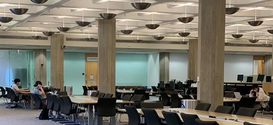
The majority of the over 150 WindowsXP computers the Library manages are located on the first floor of the Regenstein and Crerar Libraries. However, all library locations have computers.
These computers require all users to log in. Please see Library Computer Access for more information.
Library computers have the following software installed: Internet Explorer 7, Firefox 3, Microsoft Word 2007, Excel 2007, PowerPoint 2007, Adobe Reader 9, PDFCreator, SSH Secure Shell, QuickTime Player, Real Player, WIndows Media Player and XnView, an image manipulation program.
More information on Office 2007.
All of the computers managed by the Library are connected to the network printers. At this time, printing is not available from the NSIT WebStations.
1. Select a printer (B&W or color).
2. Enter a name for your print job & click OK.
3. Go to the nearest network printer to release your print job. If not printed within 2 hours, the job will disappear from the print queue.
NOTE: there is a fee for printing.
More details are available here.
You can save files to a USB drive, or the folder at C:\Public. Please note that the contents of this folder can be accessed by all users of a computer and all files are deleted nightly.
All Library computers have DVD-RW drives that can burn CDs or DVDs
Yes. All Library computers have DVD drives that can play CDs or DVDs. There is also DVD viewing equipment on the third floor of Regenstein Library, room 306. This includes a mulit-region DVD player.
There is an 8 1/2" x 11" scanner in Crerar Library on the first floor, near the reference desk.
There are three 8 1/2" x 11" scanners on the first floor of Regenstein, near the network printing stations.
There are 11" x 17" scanners in Art Reserve (Room 420) and the Map Collection (Room 370).
Scanning using Adobe Acrobat
Soup Up Your Laptop
A collection of tools to help streamline your research.
Ethernet and wireless networks are available in most of the libraries for laptop users. These networks are managed by Networking Services and Information Technologies (NSIT) and access is limited to current students, faculty, staff and alumni who have claimed their Alumni CNetID .
Laptop printing is available in all Libraries. You must install software that is specific to the Library where you wish to print.
More information can be found here.
Windows Vista users: you must use the "Run as Administrator" option for the software to install correctly.
Crerar Library
Windows B&W
Windows color
Mac OS 10.4+ (Tiger and Leopard)
Mac OS 10.3 (Panther)D'Angelo Law Library
Windows B&W
Mac OS 10.4+ (Tiger and Leopard)
Mac OS 10.3 (Panther)Eckhart Library
Windows B&W
Mac OS 10.4+ (Tiger and Leopard) Mac OS 10.3 (Panther)
Regenstein Library
Windows B&W
Windows color
Windows Duplex B&W
Mac OS 10.4+ (Tiger and Leopard)
Mac OS 10.3 (Panther)
See instructions for setting up your laptop to use the Regenstein's double-sided printerSocial Service Administration Library
Windows B&W
Mac OS 10.4+ (Tiger and Leopard)
Mac OS 10.3 (Panther)
The Computer Science department Instructional Lab, commonly known as the MacLab, is located on the A-Level of Regenstein Library. Access is limited to current students, faculty and staff.
NSIT Web Stations are locted in Crerar and Regenstein Libraries and are intended for quick access to the web and email. They are not connected to network printers. Access is limited to current students, faculty and staff.
NSIT provides access to productivity and statistical software on USITE computers. These are located on the A-Level of Regenstein Library and at Crerar Library.
Software available on USITE computers This list may not be current.
Access is limited to current students, faculty and staff.
Yes. The Library offers workshops and consultations on using EndNote.
- NSIT offers connectivity software for free.
This includes web browsing, email and anti-virus software.- Some software is available at a discounted price as part of the Universty's site licences.
- Microsoft Office software is available under the Microsoft Campus Agreement
- Other software can be purchased at a discount from the NSIT Solution Center
Report problems with Library computers to the nearest service desk.
Library accounts are managed by the Identification and Privileges Office
Contact NSIT Support Line: 8:30AM to 6:00PM, Mon - Fri (773) 834-8324
OR support@uchicago.edu OR consult NSIT's Documentation and Troubleshooting page.